
Product · AI Virtual Try-On
Your catalogue, on your shoppers
So your shoppers judge fit before they buy. One selfie builds the avatar, and your catalogue is browsed on their own body.
- One selfie builds your shopper’s avatar
- Each top and bottom shown on their own body
- Runs on your hardware or your cloud account
- Customer photos stay inside your perimeter
- full-length, and your whole catalogue is shown on the shopper’s own body
- 1 photo
- height, shoulders and frame are the shopper’s, never a catalogue model’s
- Their build
- suggested from their height and your own size chart, never guessed
- Their size
- fit is judged on the body before checkout, where size and fit returns begin
- Before the order
Interactive preview
Try it on
Pick a top and a bottom, the way your shopper would. One avatar, 10 tops and 9 bottoms, each pair rendered ahead of time by the engine.
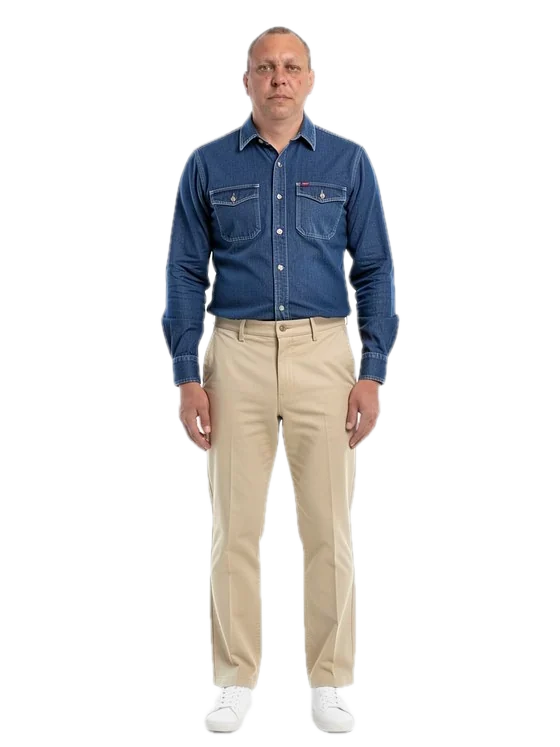
Indigo Denim Work Shirt
with straight-leg beige cotton chinos
Drag or swipe a rail · tap a piece to try it on
01 · Pick a top
T05 / 10
02 · Pick a bottom
B01 / 9
Switching swaps finished frames, so it is instant and needs no GPU. The body stays identical because each garment is laid onto one base.
Integration
Add it to your store
So your shoppers try every piece on themselves before they buy.
- 01Install one script on web, one package on iOS and Android
- 02Your shoppers see each piece on their own body
- 03Sizes come from your size chart and the shopper’s height
- 04Every add-to-bag lands in your cart, checkout stays yours
- 05The selfie is deleted once the avatar is built
- 06The avatar expires within 30 days, or sooner in one tap
Internal preview. The demo and the docs open inside the Oxagile network.
product page
<script src="https://<sdk-host>/sdk/v1/oxa-tryon.js"></script>
<div id="try-on"></div>
<script>
  OxaTryOn.mount('#try-on', {
    key: 'pk_live_…',
    productId: 'SKU-123',
    theme: { accent: '#E2231A', radius: 12 },
    onAddToCart: async (items) => {
      await cart.add(items); // your cart, your checkout
      return items.map((i) => ({ productId: i.productId, size: i.size, status: 'added' }));
    },
  }).on('added_to_cart', (e) => analytics.track(e.name, e.props));
</script>
Fit, judged before checkout
So try-on stops being a separate step. Browsing your catalogue is the try-on.
Your shopper sees each garment on their own body
Size and fit settled before the order
No fitting room and no extra step
Capabilities
How a frame is built
Your shopper’s avatar is built once. Each garment is a layer over it.

Capabilities
Where it runs
So photos and weights stay inside your perimeter, on hardware you choose.
Next step
Put your own catalogue in it.
Send us 20 products shot on white. You see your own range on a test avatar, in the storefront.